
WCC Operation
The Woo Custom Clients Ecosystem: Total Control on Two Fronts
Discover how WCC transforms your store management and the B2B shopping experience, using the native WooCommerce logic you already know. Zero code, zero complications.
Most hybrid stores (B2C + Wholesale Public) suffer from two major problems:
1- Administrators or clients who "break" the site while navigating a complex backend (wp-admin) full of options they don't need.
2- Private catalogs that are difficult to manage, requiring dozens of hidden categories, heavy membership plugins, and tricks to hide products.
WCC eliminates both problems at their root. It separates daily operations from technical design and provides you with a clean ecosystem.
Perfect for the store administrator
The "Remote Control" of your Store (Frontend Dashboard). Take daily operations out of the delicate wp-admin and give your team an error-proof environment.
- Secure Frontend Management: Create a "Store Administrator" user, activate the "Redirect to Dashboard" box, and you're done. Upon logging in, they will manage orders, statuses, and customers from a clean, white-label visual interface without touching sensitive WordPress settings.
- Exportable Business Intelligence: Forget generic reports. Filter sales by Branch, Customer Group, Date Range, or Order Status, and export everything to a CSV file with one click. Clean data ready for your accounting team.

Perfect for the VIP / Wholesale Customer
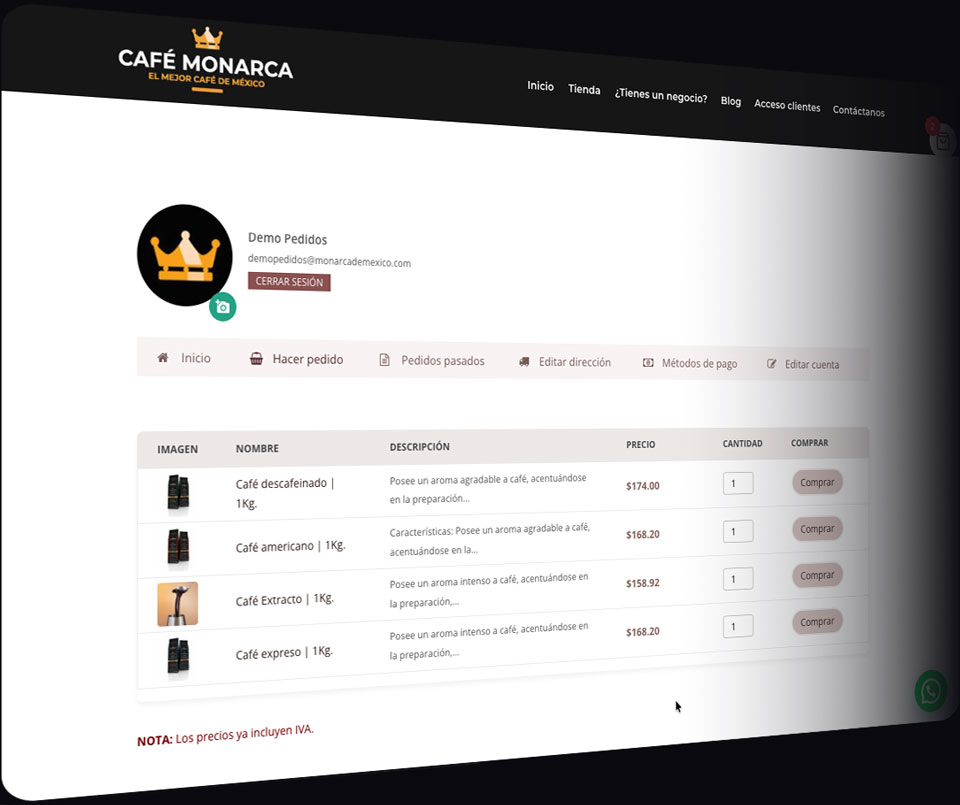
Private Mini-Stores and Smart Visibility. This is where the true B2B magic happens. Assign exclusive products to specific groups (e.g., "Distributor 1", "North Branch Coffee Shop").
-
The Magic of "Hidden" (Native): Do you have an exclusive product that you don't want the general public to see? Simply configure it as ""Hidden"" in the Visibility section of WooCommerce's native catalog. WCC is so smart that it will keep it hidden from the world, but automatically display it in the mini-store of the group to which it was assigned. Goodbye tricks with categories!
-
Total Isolation: The Client from "Branch A" will never see the prices, packaging or products of the Client from "Branch B".
3-Step Implementation (Zero Code)
STEP 1: Create your Groups
Define who your VIP customers are. Go to your new administrative Dashboard and create groups like "Gold Distributors" or "Downtown Branch". You only need to give them a name.
STEP 2: Assign Users and Products
-
For the customer: When creating their user, simply select their group in the new dropdown menu.
-
For the product: Assign it to the corresponding group from the WooCommerce edit screen. If it is a 100% private product, set its visibility to "Hidden". WCC will do the rest.
STEP 3: Deploy with Shortcodes
Paste the shortcode on any page (even in the native "My Account" area). The plugin will automatically detect who is logged in, which group they belong to, and will instantly display their personalized inventory.
Video Tutorials
Frequently Asked Questions about Operation
Do I have to create special categories or use passwords to hide products?
No! That is our biggest advantage. WCC uses WooCommerce's native "Visibility: Hidden" option. If a product is hidden but assigned to a group, our plugin overrides the hiding only for that logged-in user. Your public store stays clean and your private store secure.
Can I have multiple store administrators with this access?
Yes, you can create as many users with the "Store Administrator" role and Dashboard redirection as you need. Ideal for managers of different branches to manage their own orders.
Does the owner's dashboard replace WooCommerce?
No, it simplifies it visually. The owner or administrator sees exactly what they need for day-to-day operations (Orders, Customers, CSV Reports) without the risk of misconfiguring the site's design or plugins.
Does it work well with visual builders like Divi or Elementor?
Absolutely. By relying on clean shortcodes and native WooCommerce functions, WCC adapts perfectly to any design or visual builder you use.
Can I customize the Dashboard design with my brand's colors and logo?
Absolutely! WCC is designed to be 100% white-label. From the plugin settings, you can upload your logo directly from the WordPress media library and adjust the color palette so that the dashboard perfectly matches your agency's or your client's visual identity.